


PHP Developer? Build a Full-Featured E-commerce Site in 30 Minutes

BeikeShop Official Website: beikeshop.com
BeikeShop is a premier open-source e-commerce system built on the Laravel framework. Specifically designed for cross-border trade, it offers a fully customizable, multi-language, and multi-currency solution for businesses looking to scale their independent global storefronts.
Imagine you're a PHP developer, and an e-commerce project comes your way—the client wants a standalone online store capable of selling products, accepting payments, and managing orders.
You have two choices before you: Option A: Build from scratch. Product models, shopping cart, checkout flow, payment integration, order management, admin control panel... conservatively estimated at 2–3 months. Option B: Use an off-the-shelf open-source e-commerce framework and spend your time on business customization rather than reinventing the wheel. See full results in just 30 minutes.
In today's tutorial, I'll guide you through building a fully functional standalone e-commerce store from scratch using BeikeShop—an open-source e-commerce system built on Laravel.
Environment Requirements
Before you begin, ensure your server or local environment meets the following requirements:
- PHP >= 8.2
- Composer (PHP Package Manager)
- MySQL 5.7+ or MariaDB 10.3+
- Nginx or Apache
- Node.js >= 16 (for front-end resource compilation)
💡 Tip: If you have developed projects with Laravel before, these environment requirements are identical to what you normally use, so no extra configuration is needed.
Step 1: Install BeikeShop (5 Minutes)
BT Panel (aaPanel) One-Click Installation (Recommended)
1. Install BT Panel on your server
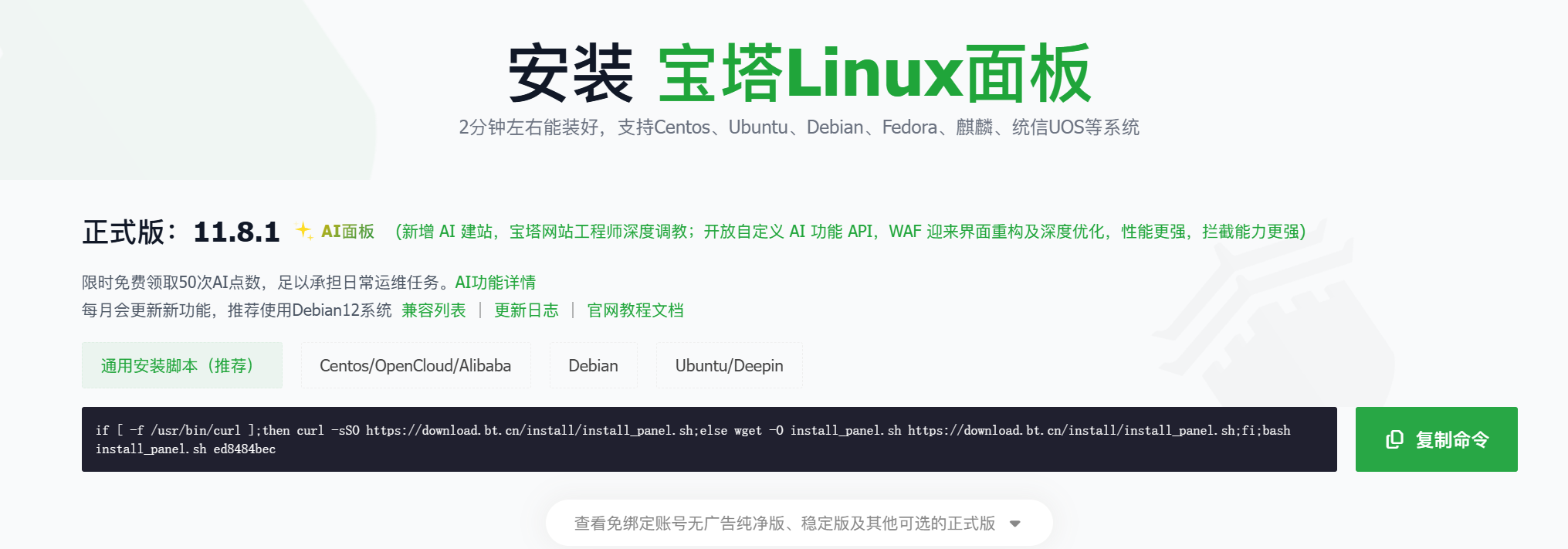
https://www.bt.cn/new/download
2. Open the App Store, search for "BeikeShop", and begin deployment
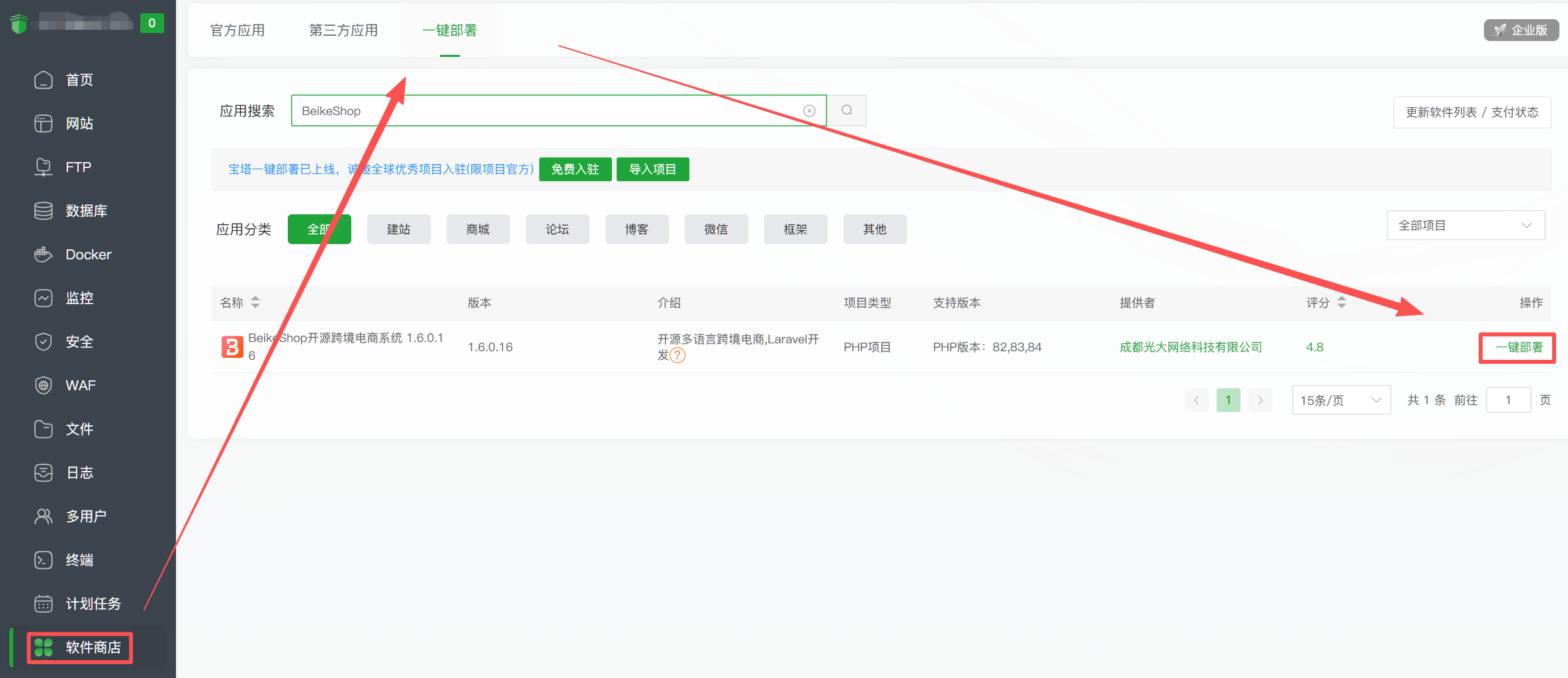
⚠️ Note: The added domain needs to be resolved to your server IP via your domain registrar.
3. Once deployment is complete, enter the installation wizard
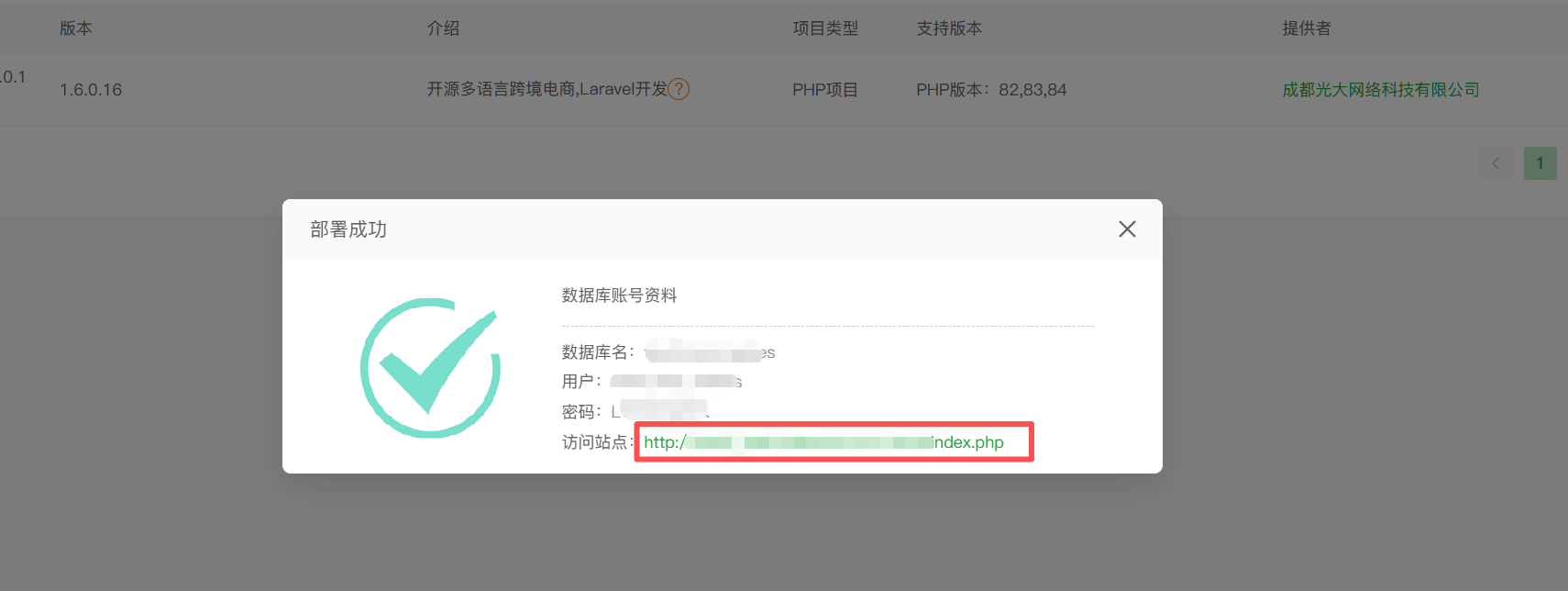
Simply click to visit the site!
For more installation methods, please refer to the official BeikeShop documentation: https://docs.beikeshop.com/
Step 2: Configure Basic Information (5 Minutes)
After installation is complete, log in to the admin panel: [http://your-domain.com/admin](http://your-domain.com/admin)
1. Set basic site information
Go to System Settings → Basic Settings:
Site Name: Your brand name
Site Description: A one-sentence introduction to your store
Contact Email: Customer service email
Contact Phone: Customer service phone number
2. Configure currency and language
Go to System Settings → Localization:
Default Currency: USD / CNY / EUR (select as needed)
Supported Currencies: You can add multiple; the system will automatically display a currency switcher
Default Language: Chinese / English
Supported Languages: Enable required language packs (11 built-in languages available)
3. Configure payment and shipping
Go to System Settings → Payment Management:
Built-in supported payment methods:
- PayPal (Standard, Express Checkout)
- Stripe (Credit Card)
Select the payment methods you need and configure the relevant API keys.
Go to System Settings → Shipping Management:
The system comes with a built-in "Flat Rate Shipping" plugin.
You can also choose plugins from the Plugin Marketplace:
- Flexible Shipping / Dynamic Rates
- Pickup Point Collection
- Global Express Shipping, etc.
💡 For Developers: Both payment and shipping modules are structured as Laravel Packages. If you want to integrate a custom payment gateway or shipping API, you can refer to the plugin development documentation; extension is extremely convenient.
Step 3: Add Products (5 Minutes)
Go to Product Management → Product List → Create Product
Basic Product Information:
Product Name: Your product title
Product Description: Supports rich text editing; you can insert images, videos, and other media
Product Category: Select or create a category
Brand: Select or create a brand
Pricing and Inventory:
Selling Price: Product price
Market Price: Strikethrough price (original price)
Stock Quantity: SKU inventory
SKU Code: Unique product identifier
Multi-Variant Products (e.g., different colors and sizes):
BeikeShop natively supports multi-variants (similar to a SKU matrix). Simply add variant attributes:
Color: Red, Blue, Black
Size: S, M, L, XL
The system will automatically generate all combinations, and price and inventory can be configured individually for each combination.
Product Images:
Supports batch upload and drag-and-drop reordering. The first image serves as the main cover photo.
SEO Settings:
SEO Title: Custom search engine title
SEO Description: Custom search engine meta description
URL Alias: Custom product page URL slug (e.g., /products/my-awesome-product)
⚠️ Note: Custom URL alias is an extension plugin and requires separate purchase.
After filling in the details, click Save, and the product will immediately be displayed on the storefront.
Step 4: Theme Configuration (10 Minutes)
BeikeShop comes with a clean and modern default e-commerce theme out of the box. If you need to customize the appearance:
Method 1: Admin Panel Configuration (No-Code)
- Go to Design → Template Settings to select your purchased theme template;
- Go to System → Image Settings to configure storefront and admin logos and favicons;
- Go to Design and access tabs like "Navigation Settings", "Homepage Customization", and "Footer Customization" to configure relevant modules.
Method 2: Developer Customization (Code-Level)
BeikeShop's theme system is based on Laravel Blade templates:
# Theme files are located at
resources/views/
You can:
- Directly modify Blade template files
- Create child themes that inherit from the default theme
- Customize CSS/JS assets
- Use Laravel Mix to compile front-end assets
# Compile front-end assets (if needed)
npm install
npm run dev    # Development environment
npm run build  # Production environment
💡 Developer Tip: BeikeShop's plugin system also follows standard Laravel Package architecture. If you have written Laravel packages before, you will get up to speed very quickly—Service Providers, Routes, Migrations, Views, everything follows the standard Laravel conventions.
Time Required to Build a Site with BeikeShop
| Step | Time |
|---|---|
| Install BeikeShop | 5 minutes |
| Configure Basic Information | 5 minutes |
| Add Products | 5 minutes |
| Theme Configuration | 10 minutes |
| Total | 25 minutes |
In just 25 minutes, you will get:
- ✅ A complete standalone e-commerce store (product showcase, shopping cart, checkout flow)
- ✅ A store supporting multiple payment methods (PayPal, Stripe, etc.)
- ✅ A multi-language and multi-currency store
- ✅ A store equipped with a comprehensive backend management system
- ✅ An SEO-friendly store
- ✅ A responsive store optimized for mobile devices
Without writing a single line of core code—because BeikeShop has already built all the core e-commerce logic for you.
As a PHP developer, your time should be spent on business differentiation, rather than re-implementing shopping carts and checkout flows.
Next Steps
-
Read the Official Documentation:
[https://docs.beikeshop.com/](https://docs.beikeshop.com/) -
Browse the Plugin Marketplace:
[https://beikeshop.com/plugin](https://cdnx.beikeshop.com/plugin)to explore more extensions -
Check the GitHub Repository:
[https://github.com/beikeshop/beikeshop](https://github.com/beikeshop/beikeshop)to inspect source code, submit issues, and contribute code
BeikeShop is open-source, free, and easy to get started with. Whether you are taking on client projects, building your own online store, or learning Laravel e-commerce development, it is definitely worth a try.
Welcome to contact us! Email: marketing@guangda.work
Click the link to learn about the product: https://beikeshop.com/
All rights reserved. Reprint must indicate the source!